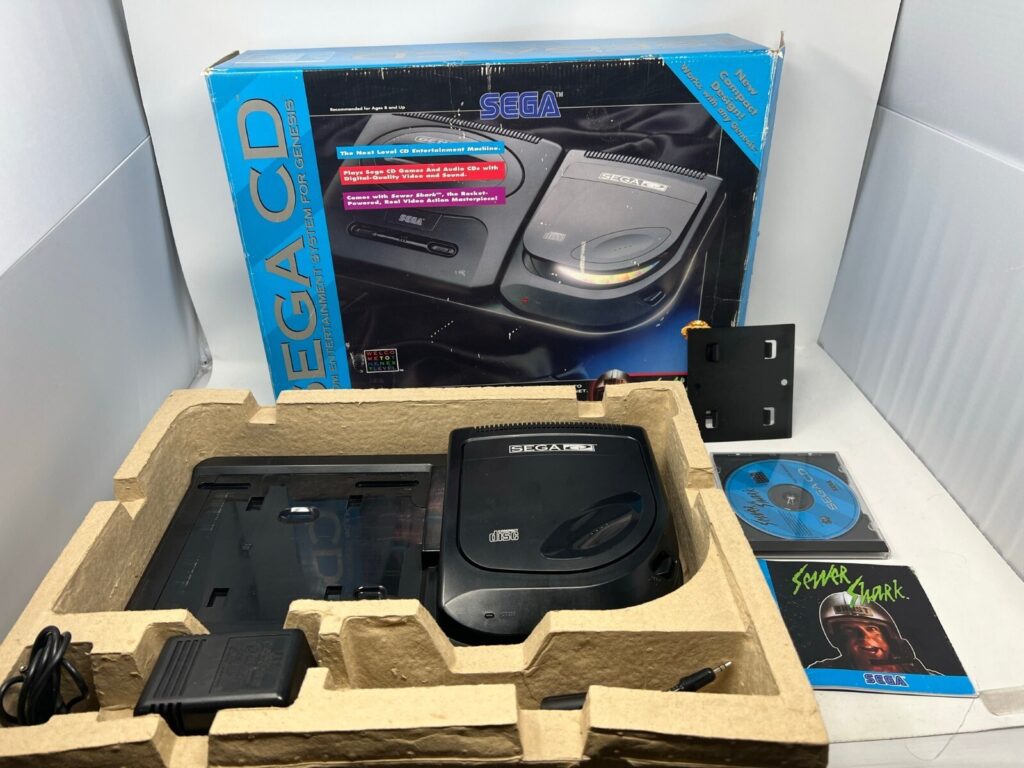
The Sega CD is not one machine. It is a family of them — two main add-on designs, a celebrated all-in-one, a licensed luxury cousin, and a tangle of pairing rules with the Genesis consoles they dock with — and thirty years on, buying one means navigating belt drives, ageing capacitors and tray mechanisms that each fail in their own signature ways. This guide walks the whole family: what each variant is, what it pairs with, what typically goes wrong, and how modern optical-drive-emulator and flash-cart options have quietly solved the “my discs are dying” problem for good. No prices — the market moves too fast for print — just the knowledge you need before you shop.

The shape of the family
Every Sega CD is the same idea — a CD-ROM drive with its own faster processor, extra memory, and scaling-and-rotation hardware, bolted onto a Genesis/Mega Drive through the cartridge slot and expansion port — expressed in different plastic. The games do not care which shell you own; any Sega CD plays any Sega CD game from its region, subject to the system’s region lock. What differs between models is size, loading mechanism, reliability profile, and which Genesis consoles they physically fit. Think of the choice as ergonomic and mechanical, not technical: the library is identical, the maintenance is not.
Model 1: the motorised front-loader
The original 1991 Japanese / 1992 Western Sega CD sits underneath the Genesis like a plinth, loading discs through a motorised front tray that glides out at a button press. It is the best-looking configuration ever sold for the system — a proper hi-fi-stack component, designed to pair with the original model Genesis, whose headphone jack and volume slider complete the period look. It is also the diva of the family. The motorised tray depends on a rubber belt that, three decades on, has almost universally stretched, cracked or turned to tar; a Model 1 that will not open, or opens and immediately rethinks it, is usually a belt asking for replacement rather than a dead laser. The tray mechanism’s gears and limit switches add their own failure modes, and Model 1s are simply scarcer, because later, cheaper production runs belonged to its successor. Buy one for love and for the shelf, budget a belt service into the purchase, and pair it with the Model 1 Genesis it was drawn for — it physically accepts later Genesis models with an extender, but the proportions were made for the original.
Model 2: the sensible side-loader
Redesigned in 1993 to cut cost and to match the redesigned Genesis Model 2, the second Sega CD moves the console to the side: the Genesis sits on top of a base, and the CD drive becomes a top-loading flip lid on the right. Top-loading sounds primitive and is, mechanically, a blessing — there is no tray belt to die, no motorised drawer to jam, and the failure list shrinks to the laser sled and the lid switch. Model 2 units are the most common, generally the most affordable, and the easiest to keep alive, which is why most working collections run on them. Pairing notes: it was designed around the Genesis Model 2 but accepts the original Genesis Model 1 with a small metal extender plate for stability, and both it and the Model 1 carry a mixing consideration — the original Genesis can pass its audio through the Sega CD with a mixing cable for proper stereo, while the Model 2 Genesis outputs stereo from its AV port directly. Forget the mixing cable on a Model 1 Genesis setup and your Sega CD games will play with a chunk of their sound missing, a classic first-week owner mistake.
CDX: the all-in-one jewel
In 1994 Sega folded the whole stack into the CDX (Multi-Mega outside North America): Genesis, Sega CD and a portable CD player in a unit roughly the footprint of a paperback, with the cartridge slot and top-loading CD lid sharing one elegant shell. It is the collector’s darling for rational reasons — one power supply instead of the original stack’s infamous trio of wall warts, a tiny footprint, excellent build quality, and full compatibility with the cartridge and CD libraries (32X use is possible with a stabilising spacer, though the combination is nobody’s idea of portable). Its failure modes are those of compact engineering: it runs its components close together, its capacitors are a known service item as the units age, and repairs are fiddlier simply because everything is in one small box. If you find a working CDX, you have found the connoisseur’s way to own the platform.

JVC X’Eye: the licensed luxury cousin
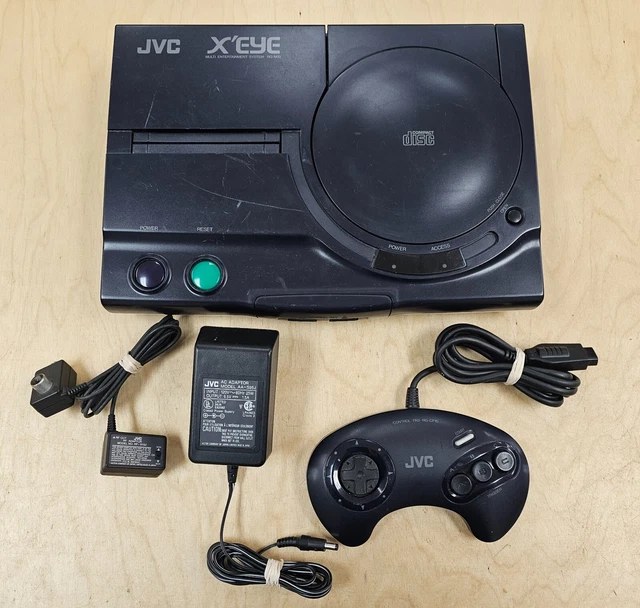
JVC’s X’Eye (the Wondermega in Japan, in still fancier form) licensed the same combination — Genesis and Sega CD in one unit — and aimed it at the hi-fi shelf: a substantial, well-built machine with a motorised CD lid, microphone input and karaoke leanings from JVC’s audio heritage, and a reputation among owners for solid, quiet operation. The X’Eye plays the full cartridge and CD libraries (with the same 32X caveats), offers S-Video output that the standard Sega hardware generally lacked, and tends to be serviced for the usual age-related items — capacitors, and the lid mechanism’s moving parts — rather than any design flaw of its own. It is the least common variant in North America and often the most pleasant to live with.
What actually fails: a field guide
Across the family, the recurring failures are mechanical and chemical, not electronic mysteries. Belt drives: chiefly the Model 1’s tray belt, as above — symptom, a tray that stalls or won’t stay open; cure, a belt replacement, a classic beginner-friendly service. Capacitors: like all early-90s consumer electronics, Sega CDs were built with electrolytic capacitors that are now well past their design life; symptoms range from audio that fades, crackles or drops channels, to video noise and, eventually, power problems, and leaked electrolyte can damage boards if ignored — a full recap is the standard preventive service for a keeper unit, and the CDX’s compact board makes it the most specialist job of the family. Tray and lid mechanisms: beyond belts, expect worn tray gears and tired lid switches on Model 1s, and lid-latch wear on high-mileage Model 2s. Lasers: the optical pickups themselves do die with age and use — a unit that reads audio CDs but chokes on games, or reads nothing at all, after cleaning and with known-good discs, is usually telling you its laser is tired; replacements exist, but this is the failure that pushes many owners toward the modern route below. Finally, power supplies: the original stack could demand three separate bricks for Genesis, Sega CD and 32X; tired originals cause mysterious resets, and modern regulated single-supply solutions for multi-unit stacks are one of the kindest quality-of-life upgrades in the hobby.
The modern route: ODEs and flash carts
The last decade gave Sega CD ownership a second life by removing the moving parts from the equation. Optical-drive-emulator-class devices and advanced flash carts — the Terraonion MegaSD and the Krikzz Mega EverDrive Pro are the two names every buyer will meet — plug into the Genesis cartridge slot and load Sega CD game images from an SD card, presenting them to the hardware through the same path a real add-on’s data would take; on a Genesis without a working Sega CD attached, these carts effectively supply the CD experience, including CD audio, from solid-state media. For owners, the benefits compound: no laser wear, no scratched discs, silent running, region freedom handled in the image rather than the hardware, and a library shelf that fits in a pocket. Pair one with an original add-on if you love real discs for favourites — many collectors run both — or let the cart carry the whole library and keep the hardware for cartridges. It is worth saying plainly that this is also the preservation answer: every year, more original lasers retire, and the games themselves now load identically either way.
Region, BIOS and other fine print
A few practicalities that catch buyers out. The Sega CD is region-locked at the BIOS level: a North American unit expects North American discs, a Japanese Mega-CD expects Japanese ones, and European PAL adds its own wrinkle — the hardware itself is largely shared, and the lock lives in the console’s firmware and the discs’ headers rather than in anything exotic, which is why modern flash-cart and ODE routes, and replacement region-free BIOS modifications for original drives, have become the standard answers for import collectors. Do not assume a Japanese unit is a bargain until you know how you will feed it. Similarly, save memory divides opinion: the system carries a small internal backup RAM, adequate for a game or two and wholly inadequate for the RPG library in this wave — Lunar saves alone will teach you this — and the CD Backup RAM cartridge, which slots into the Genesis cartridge port, is the period-correct expansion; on the CDX and X’Eye the cartridge slot placement makes the same solution available. Finally, the expansion’s own processor means a Sega CD stack draws more power and produces more heat than a bare Genesis; give the tower air, use healthy regulated supplies, and never hot-swap anything in the chain. None of this is exotic. All of it is the difference between a stack that serves you for another decade and one that becomes a forum post.
Buying used: a five-minute inspection
Whatever the variant, the same short inspection separates a keeper from a project. Power the unit on and watch the access light behave — regular, purposeful activity is health; endless seeking is a laser or disc complaint. Load a known-good game disc, not a scratched favourite, and let an FMV-heavy introduction play: smooth video with clean audio clears the drive, the sled and the sound path in one test. Work every tray, lid and eject through three cycles; listen for belt slip and gear protest. Check the cartridge slot and expansion connector for corrosion, smell the vents for the sweet chemical tang of unhappy capacitors, and confirm which power supplies are included — and whether they are original, tired, or modern regulated replacements. Then check the battery-backed save memory by saving, powering down for a minute, and loading. Five minutes, six answers, no surprises.
Which one should you buy?
For a first, working, everyday Sega CD: the Model 2, serviced or serviceable, paired with either Genesis generation — it is the commonest, simplest and cheapest to keep alive. For the shelf and the ceremony: a Model 1 with a fresh belt, under an original Genesis. For one-box elegance: the CDX if your budget and luck align, the X’Eye if you value build and video output and find one first. And for everyone, whichever shell you choose: budget for capacitors, respect the mixing cable, and consider the SD route before your laser makes the decision for you. The games — as the rest of this build-up wave argues at length — are worth the housekeeping.