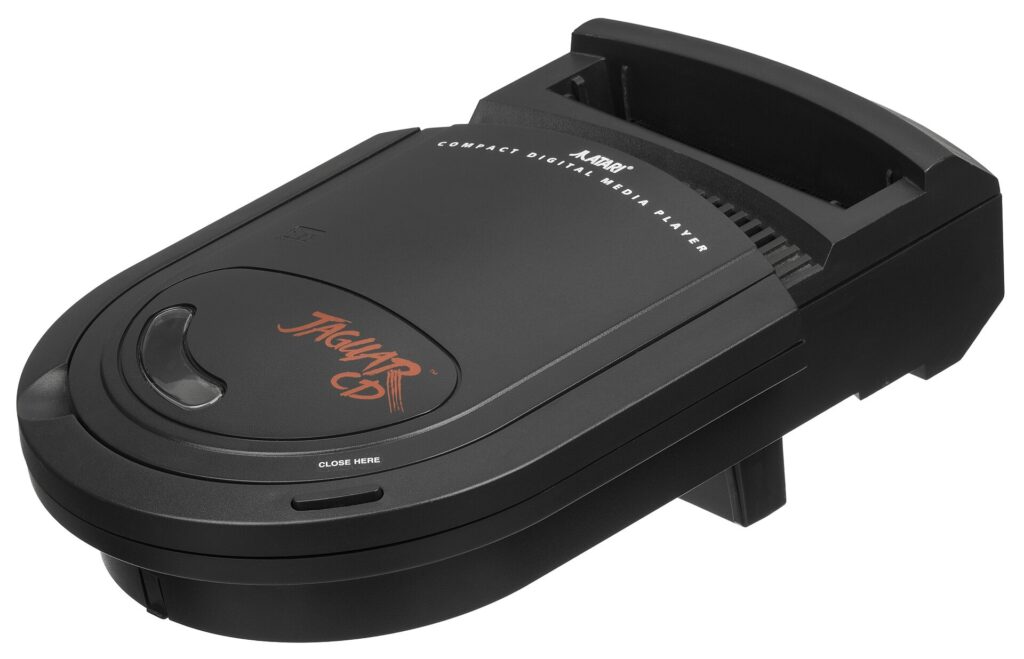
Buying an Atari Jaguar in 2026 is a different hobby from buying most retro consoles. The library is small, the hardware is uncommon, the prices are a market unto themselves (so this guide stays qualitative — it will help you buy the right Jaguar, not quote you figures that will be stale by spring), and the machine rewards buyers who know its three big decisions in advance: cartridge or CD, which controller, and how you intend to get games and a picture in the modern age. Get those three right and the Jaguar is a joy. Get them wrong and it is an expensive ornament shaped, memorably, like a toilet seat once you add the CD.
Step one: the base console
The good news is that Jaguar hardware is simple. There was essentially one console: the model sold from 1993 to 1996, in NTSC and PAL variants, with no meaningful internal revisions to hunt for and no “better” production run to pay a premium over. What matters is condition and completeness. Check the cartridge slot for damaged pins, confirm the unit powers on and reads a cartridge (a cheap common cart is the standard test — insist on seeing it work), and examine the power supply situation carefully: original Atari PSUs are ageing, the Jaguar wants a specific 9V supply with the correct polarity, and a wrong or tired PSU is the source of a good share of “faulty” Jaguars that aren’t. A clean, tested, working console with its original supply is worth more than a boxed gamble.

Region is the second consideration. Jaguar cartridges are not region-locked in the way later disc systems were, and the library is small enough that collectors routinely mix NTSC and PAL carts — but the console’s video output follows its own region, so a PAL machine on a modern display is a different practical proposition from an NTSC one. Buy the region that matches your display chain and your electricity, and treat any seller confusion about which theirs is as a reason to walk away. Finally, budget a thought for the AV output: the Jaguar’s rear edge connector carries composite, S-Video and — prized by picture-quality hunters — RGB, depending on the cable you attach. More on that below.
Step two: the Jaguar CD question
The Jaguar CD add-on sits on top of the console, plugs into the cartridge slot, and divides Jaguar owners into two camps: those who must have the complete system, and those who have read about its reliability. Both are right. The CD library is tiny — around a dozen official games — but it holds real treasures: Battlemorph, Iron Soldier 2, the definitive Myst conversion of its day, plus oddities like the built-in Virtual Light Machine, Jeff Minter’s music visualiser that lives in the unit’s firmware and turns any audio CD into a lightshow. The add-on also plays a beloved role as the system’s great what-if.

The caution is mechanical. The CD units were built in modest numbers, the drives are three decades old, and sellers’ descriptions of CD hardware deserve the strictest reading in retro gaming: “untested” should be priced and treated as “not working”, and even demonstrated-working units are a maintenance commitment. Our honest buying advice: enjoy the cartridge library first. Add the CD later, knowingly, if the format fascinates you — ideally bought tested, in person or from a seller whose returns policy you trust — and consider that the Jaguar CD games can also be experienced through emulation while an original unit remains a long-term project. The Memory Track cartridge, which provides save storage for CD games, is a necessary companion purchase if you go the original-hardware route.
Step three: controllers, plural
Every Jaguar pad carries the system’s signature oddity: a full numeric telephone keypad, used with printed game-specific overlays for everything from weapon selection in Doom to plays in the sports titles. The standard controller is better than its odd looks suggest — a comfortable shell, a serviceable D-pad, three fire buttons — and overlays matter more than new buyers expect: a game bought without its overlay (where it had one) is a game you’ll play with a reference sheet. Check listings for them.

The Pro Controller is the connoisseur’s upgrade: five additional buttons (shoulders and extra face buttons), a more refined D-pad feel, and support from later games that mapped real functions to the extra inputs. It is the kinder pad for precision platforming and the natural choice if you plan to live with Rayman. Two warnings, both qualitative: originals command collector money, so learn their markings before paying Pro prices for a standard pad; and the Jaguar’s multiplayer party trick — the Team Tap adapter, enabling four-player NBA Jam: Tournament Edition among others — is a separate accessory with its own compatibility list. Buy controllers tested, and buy two: this library’s multiplayer (Doom link games aside, which need two of everything) is half its charm.
The modern way to own one: games, picture, sanity
Three pieces of modern kit have transformed Jaguar ownership. First, the RetroHQ Jaguar GameDrive: a microSD-based flash cartridge that loads the library — including, remarkably, Jaguar CD images — from a card, bypassing both cartridge prices and the CD drive’s fragility in one stroke. For most 2026 buyers it is the single best purchase after the console itself, turning the Jaguar from a collector’s toll-road into a system you actually play nightly. It also makes the homebrew and aftermarket scene — decades of new games, demos and rescued prototypes — a download rather than an expedition. Second, the picture: the Jaguar’s RGB output, fed through a quality SCART or component solution into an upscaler of the RetroTINK or OSSC class, produces a startlingly clean image on modern TVs, and even its S-Video output embarrasses most consoles of its year. Third, emulation as a sampler: the BigPemu emulator is, by wide agreement, superb — accurate, fast and free — and the sensible 2026 workflow is to try the library there, then buy the hardware knowing exactly which Jaguar fan you are.
What to play first: building the starter shelf
A new Jaguar deserves a planned first shelf, because random buying in this library is how people end up with the punchlines instead of the classics. The essential core is smaller than you think and covers the machine’s whole range: Tempest 2000 and Alien vs Predator for the flagship argument; Doom and Wolfenstein 3D for the id seal of quality; Rayman for the 2D masterpiece; Iron Soldier for the homegrown 3D case; and one great racer — Super Burnout or Power Drive Rally — for the sprite hardware at full song. From there, let taste lead: Defender 2000 and the hidden-gems shelf (there is a full list elsewhere on this site) for the arcade faithful, Cannon Fodder and the Bullfrog pair for the strategists, Atari Karts for the sofa. Buy the games you will play loose and playable rather than sealed and theoretical — the Jaguar’s cartridges were built like bricks, they survive handling beautifully, and the system’s entire value proposition in 2026 is that it is played, not vaulted. If a flash cart covers the library for you, spend the cartridge money on the hardware’s condition instead: a mint console, two good pads, a Pro Controller, and the best video cable your display chain can use. That is the connoisseur’s allocation, and it never goes out of date.
Common mistakes, briefly
Four errors account for most unhappy Jaguar purchases, and all four are avoidable. Buying the cheapest untested console on the internet, then diagnosing your power-supply problem as a dead machine. Paying complete-in-box money for a cartridge whose all-important controller overlay is missing — check what’s actually in the box. Chasing the Jaguar CD before owning the cartridge library’s best dozen games, and meeting the format at its most fragile and expensive first. And finally, judging the system by its worst cartridges, which are famous, cheap and unrepresentative: the Jaguar’s floor is as low as legend says, but nobody is obliged to live on the floor. The ceiling — and the broad, solid middle of this strange little library — is the part the legend leaves out, and the part this guide exists to get you to.
A note on the community you are joining
The last thing a 2026 buyer is purchasing, though no listing mentions it, is membership of one of retro gaming’s most durable communities. The Jaguar never acquired the vast, anonymous ownership of the big consoles; it acquired a society — the people who kept the forums alive through the console’s wilderness years, who wrote the emulators, rescued the prototypes, published the aftermarket games and still release new software for a machine discontinued in 1996. Buying a Jaguar plugs you into that society’s accumulated knowledge: controller repair guides, power-supply wisdom, GameDrive setup lore, per-game overlay scans, and a standing welcome for new owners that the bigger platforms, drowning in their own scale, cannot match. Ask questions in those spaces before you spend serious money. The community has heard every Jaguar buying mistake described in this guide confessed in public, usually with photographs, and it answers newcomers the way survivors of the same shipwreck always do: promptly, precisely, and with feeling.
Storage, care and the long ownership
A brief word on stewardship, because a Jaguar bought well in 2026 should still be working in 2036. Cartridges are near-indestructible but their contacts reward a clean slot and an occasional careful swab; store them out of sunlight and damp, as you would any electronics of the era. The console itself runs warm rather than hot, wants ventilation rather than a sealed cabinet, and appreciates a surge-protected supply like all vintage hardware. CD owners carry the extra duties of the format — handle discs by their edges, keep the add-on’s lid mechanism clean and unforced, and accept that a thirty-year-old optical drive is a consumable you maintain, not an appliance you forget. None of this is onerous. All of it is the difference between owning a Jaguar and curating one, and the community’s repair knowledge — recaps, drive servicing, controller refurbishment — is deep enough now that almost no failure is final. Buy the machine, by all means. Then keep it the way its survivors kept theirs: in use.
Buying checklist
To close, the five checks that prevent almost every bad Jaguar purchase. One: see it run a cartridge, on a television, before money moves. Two: confirm the correct power supply, and plan a modern replacement if the original is suspect. Three: treat all Jaguar CD hardware as guilty until proven innocent. Four: check controllers for the keypad’s responsiveness and ask about overlays for the games you care about. Five: decide your games route — original carts, GameDrive, emulation, or a blend — before the auction fever decides it for you, because in this small, strange, wonderful library, the plan is the hobby. The Jaguar rewards the prepared. It always did punish everyone else — ask anyone who bought one in 1993 on the strength of the words “64-bit”.