
The Atari ST is the thinking collector’s bargain of the 16-bit era: a full 68000 computer with a legendary games library, a professional pedigree in music and publishing, and — because the consoles of its day stole the nostalgia headlines — prices that still respect a normal budget. But the ST family spans six years and a small zoo of models, its floppy drives are forty years old, and the difference between a happy purchase and a beige paperweight is a handful of checks. This guide walks the range, the storage and display options that matter in 2026, and the prices you should expect to pay, hedged against typical sold listings rather than optimists’ asking prices.
The models, decoded
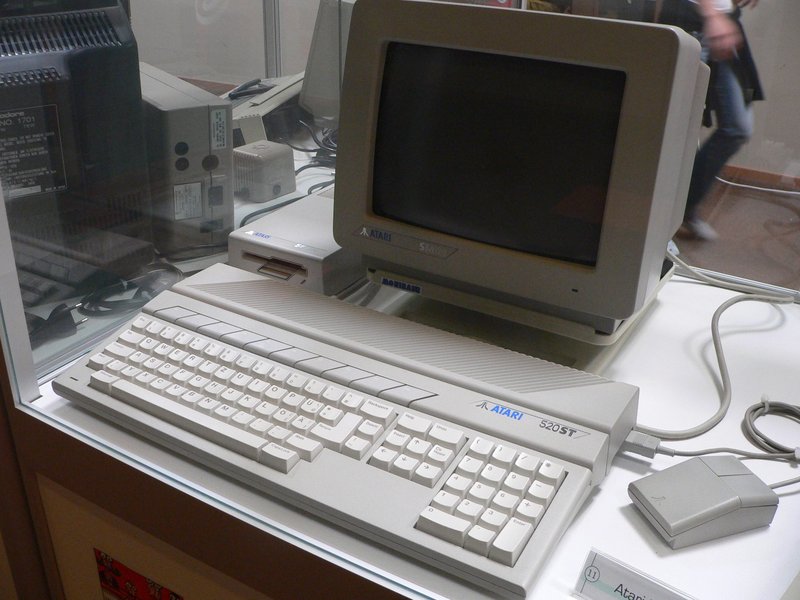
The line begins with the 520ST of 1985: 512K of RAM, an external power supply, TOS in its earliest forms, and — in plain ST form — no floppy drive built in and no TV modulator, omissions Atari quickly corrected. The 520STM added the modulator; the 520STF built in a single-sided floppy drive. The 1040ST of 1986 doubled memory to a megabyte and became the range’s centre of gravity: the 1040STF and the 1040STFM (modulator added for TV use) are the classic all-in-one machines most of the library was written for, and the safest default purchase. The Mega ST line repackaged the same technology in a professional desktop case with a separate, excellent keyboard and 1, 2 or 4 megabytes — the DTP and studio machine, and a lovely thing to own if you have the desk. Then, in 1989, the STE: 4096 colours, hardware scrolling, a blitter, better sound and SIMM-socketed memory, backward compatible with the library and the best games machine of the family. If in doubt, buy the STE; if charm matters, buy the 1040; if a Mega appears at a fair price, clear the desk.
TOS: the firmware question
TOS, the operating system in ROM, matters more than newcomers expect. Early machines carry TOS 1.0 or 1.02 — charming, and mildly buggy with modern storage. TOS 1.04, the “Rainbow TOS,” is the sweet spot for the ST/STF generation: stable, compatible with virtually everything. STE machines shipped 1.06 or 1.62, both fine, with 1.62 the connoisseur’s pick. Hard-disk drivers and mass-storage tools assume a reasonably modern TOS, and some late software checks for the STE’s 1.06 and up. Upgrading is a ROM swap — socketed on many boards, a modest job — and sellers of serviced machines often fit 1.04 or 1.62 as a matter of course. Ask what’s fitted; a one-line question that separates the maintained machines from the loft finds.

Storage: floppies, Gotek and hard disks
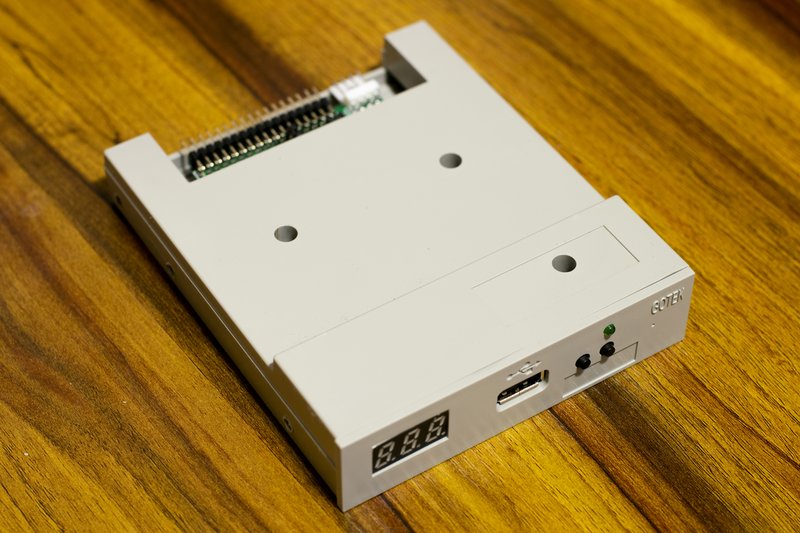
Every ST floppy drive is now old enough to need help: belts perish, heads drift, and the double-density disks themselves are a finite resource. Budget for one of three paths. The faithful path is a serviced original drive and a shelf of tested disks — perfectly viable, and the loading sounds are part of the liturgy. The pragmatic path is a Gotek: a floppy emulator that drops into the drive bay (or hangs externally), reads disk images from USB, and makes the whole library a menu. It is the single best quality-of-life purchase in ST collecting, typically the price of two or three boxed games. The connoisseur’s path is hard storage: the modern UltraSatan plugs into the ACSI port and gives an STE or ST a pair of SD cards as hard drives — fast, silent, and transformative for demos, multi-disk games and serious software — with the older SatanDisk and various internal IDE solutions serving the same faith. Whichever path you choose, note that a small minority of copy-protected originals insist on a real drive; collectors who want everything keep one healthy floppy drive alongside the modern gear.
Seeing the picture: monitors and modern displays
The ST’s display story has three chapters. The SM124 monochrome monitor is a legend in its own right: 640 by 400, rock-steady, and the sharpest text display of its class — essential for the serious-software side of the machine, useless for games, which refuse high resolution entirely. Colour gaming lived on the SC1224 (and its SC1435 successor for the STE era), a genuinely good RGB monitor. In 2026 most owners take the third chapter: the ST outputs RGB that modern upscalers and many older LCD televisions with SCART sockets handle beautifully, low and medium resolution both. One honest warning: the high-resolution mono mode needs its own signal path, so a one-display setup usually means choosing games-first and visiting mono mode on a dedicated SM124 — which, fortunately, remains the cheapest classic monitor in computing. Composite via the modulator on STM/STFM/STE models works everywhere and looks exactly as soft as you remember; RGB is the upgrade your eyes will thank you for.

The five-check buying checklist
One: power and picture. Switch on with a monitor attached — you want the GEM desktop, promptly, in the right colours, with no shimmer or rolling. Two: the keyboard. Type on every key; ST keyboards are membranes and a dead corner is a common, fixable but negotiable fault. Three: the floppy drive — format a sacrificial disk, write to it, read it back; a drive that reads shop disks but cannot format is telling you its future. Four: memory and model truth — confirm the RAM the machine reports (the desktop’s About, or a diagnostic cartridge if the seller has one) matches the badge; 512K machines are charming and limiting in equal measure, and 1MB is the library’s assumed standard. Five: the mouse and ports — the original ST mouse is a ball-driven artefact that many owners replace with optical adapters; wiggle every port, especially the cartridge and ACSI sockets, and check the MIDI ports if music is in your plans, because on this machine it so often is.

What to pay in 2026
Ballparks, hedged as they must be: asking prices run ahead of reality, and the figures that matter are completed, sold listings. A tested, working 1040STFM with mouse and PSU typically changes hands in the £90–£160 range in the UK and roughly $120–$200 in the US; a tidy 1040STE, the machine this guide recommends, sits a step higher at roughly £140–£220 ($180–$280), with serviced, recapped examples carrying a fair premium on top. Mega STs are scarcer and harder to ship, and £200–£350 for a working Mega 1 or 2 is the usual territory. An SM124 monitor, collected in person, remains a bargain at £40–£80; SC1224 colour monitors fetch more, £90–£150, on rarity. A Gotek runs roughly £30–£45; an UltraSatan, when in stock, around £90–£120 — budget both into any “cheap” machine and the true cost of a happy setup is a 1040STE, a Gotek and a SCART lead at somewhere near £250 all-in. Against the price of a single hyped console cartridge, the entire ST proposition remains what it was in 1985: power, without the price.
Memory, mice and the extras that matter
Memory upgrades are the ST’s friendliest modification. STE machines take standard SIMMs and glide to 4MB in minutes — the single best upgrade for demos, hard-disk use and late software. Earlier STs accept soldered or piggyback upgrades of varying elegance; a 1040 already sits at the library’s sweet spot, while a 512K 520 is a period piece to enjoy as-is rather than a platform to build on. Controllers are simpler: the standard Atari joystick ports accept the entire era’s arsenal, and the CX40-style sticks many owners grew up with work exactly as remembered. The mouse deserves its own sentence — original ST mice are charming, heavy and increasingly tired, and the modern optical replacements and PS/2 adapters are the quality-of-life fix veterans recommend first. Finally, the cartridge port: diagnostic cartridges are the repairer’s friend, and a seller who has run one is a seller who has done the homework you are paying for.
Buying channels and grading honesty
Where you buy shapes what you get. Auction sites offer the widest choice and the widest variance: “untested” in ST listings means precisely what it says, and a machine photographed at the GEM desktop is worth a measurable premium over one photographed in a loft. Specialist retro dealers and the community’s own marketplaces cost more and deliver serviced machines — recapped power supplies, tested drives, honest TOS versions — which for a first ST is usually money correctly spent. Computer fairs and the demoscene-adjacent events remain the connoisseur’s channel for monitors, which ship badly and should wherever possible be collected in person. Whatever the channel, the grading language is stable: “powers on” is not “works,” yellowed plastic is cosmetic and common (the bromine in the era’s flame retardants sees to that, and retrobrighting is a hobby in itself), and a missing power supply or mouse is a £30–£50 negotiation, not a dealbreaker. Buy the seller’s testing, not the badge on the case.
Setting up your first evening
Setup is mercifully brief, and it is worth doing in the order the machine’s owners have settled on over forty years. Connect the display first — SCART or RGB for colour, the SM124 for mono — then mouse, then power, and let the machine find its desktop before you feed it a disk. Test the drive with a blank before trusting it with an original. If a Gotek is fitted, its menu is your library; if an UltraSatan, the hard-disk boot’s speed will recalibrate your sense of what 1986 could do. Keep the original floppy drive connected where you can, because a small aristocracy of copy-protected originals will ask for it. Then do what the machine’s first owners did: load Dungeon Master, turn the lights down, and let the torch burn.
A word on recapping, batteries and beige
Electronics of this age carry three standard conversations, and a buyer should know their honest shape. Power supplies are the ST’s known wear item: the internal PSU in the all-in-one models runs warm, its capacitors age, and a serviced or modern replacement unit is cheap insurance that good sellers fit unprompted — ask, and treat a recent PSU recap as value, not as a modification to fear. Unlike some rivals, the ST has no leaking motherboard battery plotting against it in the standard models, which is one reason the machines survive loft storage so well; the RTC battery in Mega models is a smaller, friendlier job. And the yellowing: it is bromine chemistry, not dirt, it affects nearly every surviving machine to some degree, and it says nothing about the electronics inside. Collectors divide into those who retrobright and those who call it patina. Both are right, and neither should pay a “mint, unyellowed” premium without photographs taken in daylight. Judge the machine by its desktop, its drive and its keyboard — the beige is just its age, worn honestly.
First evening essentials
Whatever you buy, the first shelf writes itself: Dungeon Master for the RPG crown, Speedball 2 for two players, Stunt Car Racer for the jump, Midwinter for the long winter evening, and a demo disk or two to watch the machine get away with things it should not be able to do. Add Cubase if there is a keyboard in your house and a copy of Calamus if there is a printer, because the ST’s whole point was always that it was both machines at once. Welcome to the other side of the playground argument. The water, forty years on, is lovely.