
The Atari Lynx is the easiest retro handheld to fall for and the easiest to buy badly. It was advanced, fragile-by-age and sold in two distinct models; the second-hand market is full of machines described as “untested” that are, charitably, optimistic. The good news: a well-bought Lynx in 2026 is a joy — screen mods have fixed its one great weakness, flash cartridges have collapsed the cost of its library, and the homebrew scene means the machine still gets new games. This guide covers which model to buy, what to check, what the upgrades cost, and what the key games should run you. Prices are typical US asking ranges at the time of writing; the market moves, so treat them as a compass, not a contract.
Step one: Lynx I or Lynx II?
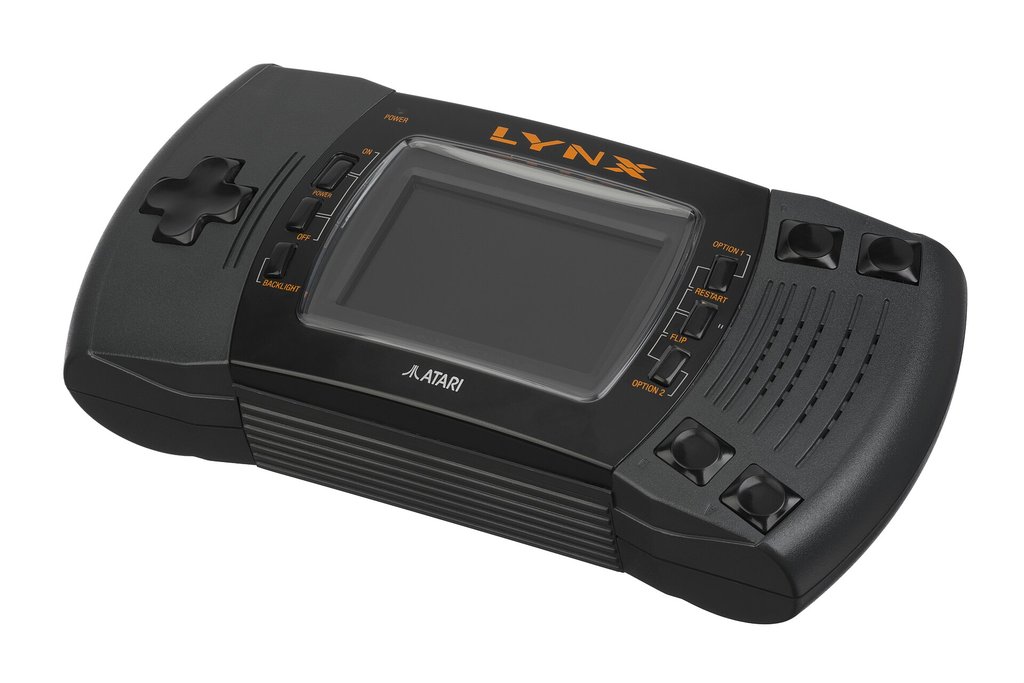
Two models exist. The original Lynx (1989) launched at $179.99: a large, angular machine with a mono headphone jack, a hungrier appetite — roughly four hours from six AAs — and a place in history as the first colour handheld. The Lynx II (July 1991) launched at $99: slightly smaller and lighter, with curved grips, a clearer screen, about fifteen percent lower power draw (five hours is realistic), a proper stereo headphone jack, a power LED, a backlight-saving option, and a cartridge slot that accepts games more graciously. Internally the games experience is identical — every cartridge runs on both, and the Lynx is region-free.
Buying advice is simple: for playing, buy the Lynx II. It is the better machine in every daily respect and usually no more expensive. Buy the Lynx I for the collection, for the launch-era design, or because a particular bundle charms you. Either way, budget for the work described below: a thirty-five-year-old Lynx that has never been serviced is a project, whatever the listing claims.
Step two: the faults to hunt before you pay
Three age-related faults account for most bad purchases. First and worst: the power circuit. The Lynx’s power regulation design means a failed component can leave a machine completely dead — and less scrupulous failures can put wrong voltages where they hurt. A Lynx sold as “no power, untested” is the market’s most common booby trap; it may be a cheap fix for a technician or an expensive paperweight for you, and you cannot tell from the listing. Second: the screen. Original LCDs degrade — dimming, losing lines, delaminating at the edges — and “works fine” listings photographed in the dark are a genre of their own. Third: capacitors. Failing caps announce themselves as a dim screen, weak or distorted sound, or a machine that needs several power cycles to wake. Any of the three is fixable by the retro repair community; all three should be priced into what you offer.
The pre-purchase checklist, in order: ask for a photograph of the machine powered on, playing a game, in normal room light. Ask whether the power circuit has ever been serviced. Check the cartridge slot and the battery compartment for corrosion. Confirm the speaker and headphone jack both work. And be wary of any seller who cannot show the machine running — in Lynx terms, “untested” should be read as “broken, price accordingly”.
Step three: the screen — the mod that changes everything

Here is the modern Lynx’s open secret: the machine’s famous weakness — a dim, blurry, power-hungry screen by today’s standards — is completely curable. Replacement LCD and IPS kits have been the community’s defining upgrade for a decade. The best-known is the McWill LCD kit, which swaps the original panel for a bright modern display (with a VGA output option for the truly committed) and transforms contrast, clarity and battery life at a stroke. BennVenn’s IPS kits are the other established route, prized for viewing angles and colour, and RetroSix’s CleanScreen line offers IPS kits engineered around the Lynx’s unusual variable refresh rates, solder-free on the Lynx II. Kits typically run in the region of $60–$120 depending on maker and model; fitting is a soldering job on most variants, and install services exist if your iron hand is unsteady (a full professional install with servicing bundled can reach roughly $260).
Should you buy pre-modded? A machine with a named screen kit, fitted by a known installer, is the best-value way into the Lynx in 2026 — you skip the queue, the risk and the soldering, and the premium over a tired unmodded unit is usually smaller than the kit-plus-fitting cost. Insist on knowing which kit is inside. “New screen” without a maker named is a question, not a feature.
Step four: power — feeding the beast in 2026

The Lynx drinks six AAs and was famous for emptying them in four to five hours; alkaline disposables in 2026 are both expensive and indefensible for the purpose. Modern answers, in ascending order of commitment: high-capacity rechargeable AAs (2,500 mAh class) are the drop-in fix and roughly double period battery life. An original-spec AC adapter frees you at home — but use a correct, regulated supply matched to the original specification, because the power circuit’s fragility makes cheap unregulated wall-warts a genuine hazard to the machine. USB-C power conversions (RetroSix’s CleanPower family and community equivalents) let you run and charge from modern power banks and chargers, and pair naturally with a screen mod: many owners do power, caps and screen in a single service and emerge with a machine better than new. The official battery pack of the era — a belt-clip accessory — is a collector’s item now, not a strategy.
Step five: the flash cartridge decision
One purchase collapses the cost of exploring the whole library, homebrew included: a flash cartridge. The standard is RetroHQ’s Lynx GameDrive — around $99.99 from the AtariAge store (about $110 at some retailers) — which loads the entire catalogue from a microSD card in about a second a game, supports homebrew EEPROM saves, works on both models, and even keeps ComLynx multiplayer functional. BennVenn’s ElCheapoSD is the budget alternative at roughly $45: simpler, slower, happy with .LNX-format images up to the 512KB maximum of official releases, and perfectly adequate for most players. Either turns the Lynx from a collecting hobby into a playing library overnight — and both are the development platform the modern homebrew scene releases onto first.
Step six: what the key games cost

Loose-cartridge US prices for the essentials, at the time of writing: the good news first. Most of the library is cheap. California Games, the old pack-in, changes hands for $8–15. Chip’s Challenge runs $15–25. Klax, Shanghai, Rampart, Xenophobe and Gates of Zendocon all sit in a friendly $10–25 band. Blue Lightning, the showcase, asks $20–35; Warbirds $25–45; S.T.U.N. Runner $20–35; Robotron: 2084 and Ms. Pac-Man $15–30. Todd’s Adventures in Slime World — remember, you may eventually want eight — is $15–25 a copy.
The expensive shelf is short and specific. Lemmings is the Lynx’s price champion, typically $120–200 loose and far beyond that boxed. Ninja Gaiden III, Double Dragon and Desert Strike occupy the $50–120 tier; late releases generally (the 1994–95 tail of the catalogue) command premiums simply for scarcity. Boxed copies multiply loose prices by two to four, and the smart money buys the cartridge to play and treats the box as the luxury it is. Homebrew releases hold value differently — Songbird and AtariAge Store titles are priced as new games ($50–80 typical) and often sell out, so the time to buy a modern release is when it is announced.
Step seven: accessories worth having
Three accessories earn their money. The ComLynx cable is the essential one — originals are common and cheap, reproductions exist, and without one you own only two-thirds of the machine; buy two cables while you are at it, because the second Lynx is a matter of time. A good carry case (Atari’s own padded case is the period-correct choice) protects a screen you may have just paid to modernise. And a spare set of high-capacity rechargeables, rotating through a decent charger, ends the battery anxiety the machine was born with. The sun visor, the cigarette-lighter adapter and the other period curiosities are for the display shelf — charming, collectible, and entirely optional for play.
Three ways in, at three budgets
To make the arithmetic concrete: the player’s build is a verified-working Lynx II ($120–180 typical), a capacitor service if it needs one, rechargeable AAs and a GameDrive — call it $300 all-in for the entire library on original hardware. The enthusiast’s build adds a modern screen kit and fitting ($150–260 fitted) and starts collecting the physical essentials — a $500–600 shelf that plays everything and displays beautifully. The collector’s build chases the boxed rarities, and its budget is a lifestyle rather than a number; the advice there is patience, board photographs, and never paying a “mint” price for a cartridge you have only seen in a listing’s best light. All three builds are legitimate. The only illegitimate Lynx purchase is the unverified one.
One maintenance habit is worth adopting from day one: exercise the machine. A Lynx that is played monthly stays a known quantity; a Lynx stored for years with batteries inside is a corrosion experiment. Remove cells for storage, keep the machine somewhere dry, and run it whenever you pass the shelf. These were built to be used, and use — more than any product — is what keeps a thirty-five-year-old handheld honest.
Traps, myths and final advice
Closing traps, briefly. There is no region locking — buy the cheaper European or Japanese copy with confidence. Early cartridges have a curved lip design that can sit stiffly in some slots; it is a period quirk, not damage. Reproduction cartridges exist for a handful of rarities: a “mint” Lemmings at a third of market price is a repro until proven otherwise, so buy rarities from sellers who photograph the board. The Analogue Pocket with its Lynx adapter is a legitimate modern alternative for playing original cartridges on a superb screen — but it is a different hobby from owning the machine, and this guide assumes you want the machine.
The final advice is the arithmetic of joy. A serviced Lynx II with a modern screen, a flash cartridge and a handful of favourite originals costs less than most modern consoles, plays a library nothing else plays, and links to other Lynxes for the multiplayer experiences that made the machine a legend. Buy the best machine you can verify, service it once, feed it rechargeables, and join the small, stubborn, extremely satisfied ranks of Lynx owners. The battery joke is thirty-five years old. The games are better than the joke, the scene is healthier than the obituaries ever allowed for, and the machine — serviced, screened and sensibly fed — has never been a better buy than it is right now.